It is very important that a modern security system has all of it's component parts synchronised with the correct Time and Date. Valerus has a built in Network Time Protocol (NTP) server that will distribute it's time to other units in the system but this needs to be configured in order to work correctly.
- Application Server/ All-In-One - This can be configured using the Valerus NTP Configuration Tool to get it's time from the Internet or an GPS NTP Time Server. If none are available the Time will be provided by the PC's internal clock and will not remain accurate.
- NVR/Failover NVR - When a Valerus NVR is added to the Application Server, it automatically configures the ntp.conf file to get it's time from the Application Server. This is refreshed whenever the NVR service or PC is restarted. Therefore the NVR requires no manual intervention but can be tested using the Valerus NTP Configuration Tool
- Clients - An NTP client is not installed by default but Windows can be configured to get it's time from the Application Server. Ideally the Meinberg NTP client (the same as used by Valerus) should be installed and configured using the Valerus NTP Configuration Tool
The Meinberg NTP client can be downloaded by clicking here - Cameras - Most IP cameras have the ability to get their time from an NTP server. This can normally be found in the camera system or network settings. The IP address of the Application Server should be entered similar to the example shown below:
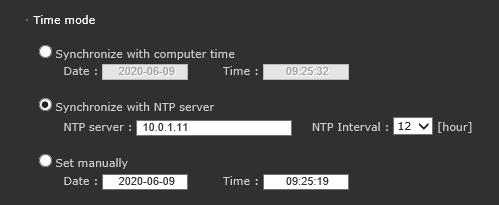
This will ensure that any on screen displays or logs from the camera are showing the correct time.
This is not essential but is recommended practise.