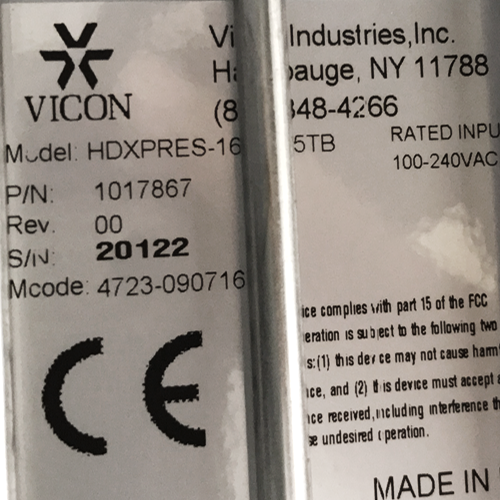
For Valerus to be able to connect to older original HD Express units such as:
( per sample in Vicon’s demo rack )
HDXPRESS-16 (no L3 or P3 in the model #)
P/N 1017867
S/N 20122
Mcode 4723-090716
The following setup is needed.
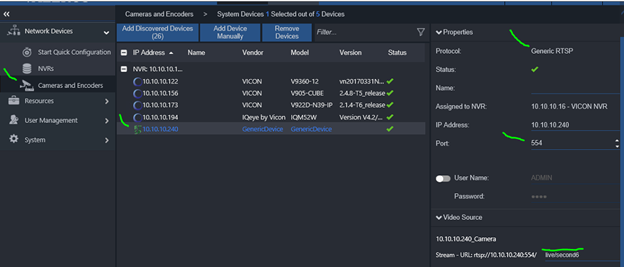
1) Use the following string: rtsp://10.10.10.240:554/live/second6 to add successfully to Valerus.
/second6 is camera 7 in HDExpress. Adding other channels would be /second0 for camera1 etc.
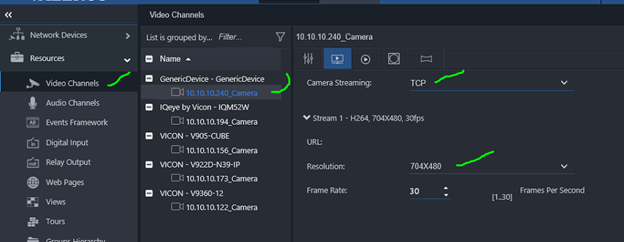
2) Change the stream resolution to 704x480. in the streams in Valerus.
3) Change the "camera streaming" in Valerus for each added channel to TCP.
4- Additionally, in the HDExpress unit I changed the Web port to 80, RTSP port to 554 (default is 8080/5554)
5- Assuming the ADMIN / 1234 is used in HDExpress, the same would be used for adding it to Valerus.
Valerus Cameras and Encoders , Add Device manually
Valerus Resources, Video Channels , Streams,