This is a brief KB regarding how to Export video from an Express or HD Express to play in Windows Media Player. ( VLC etc not required )
This will only work using iPIMS. ( export from the Express units will NOT play in Windows Media player )
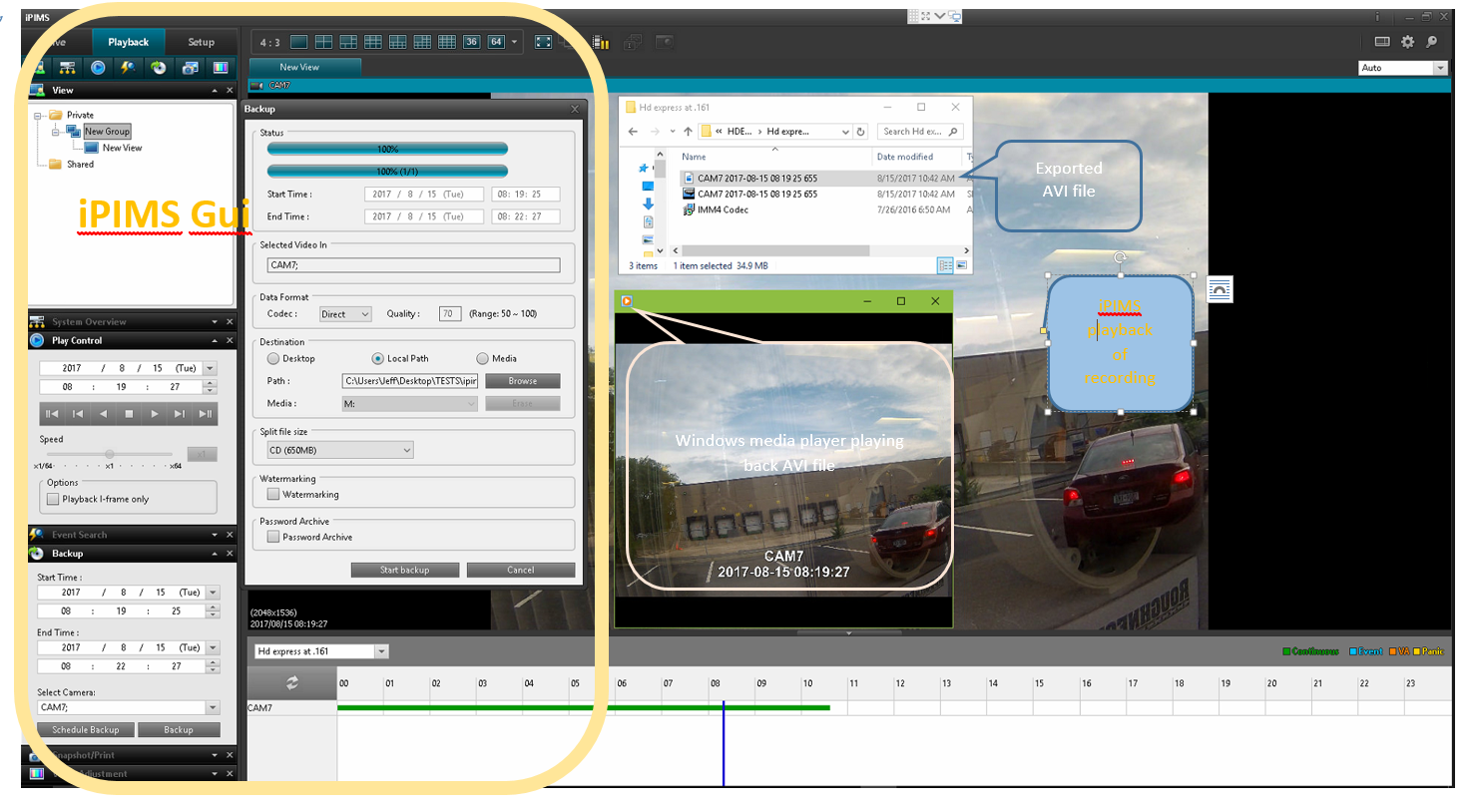
Install IPIMS, connect to Express or HD Express, Setup iPIMS for viewing then playback.
Select a camera, Backup Start / End Time, Camera. Backup, Destination.
Browse to folder then copy the " cameraname-xx.avi " to any windows machine.
This export will play directly in Windows Media Player.
Below is a screen that shows IPIMS Backup, playback of Cam7 , the Backup util ,
the " Cam7 2017-08-15....avi " file and Windows Media Player playing the AVI.
IPIMS download found here:
 |
iPIM multi-site software for HDExpress (1.4.1.96) – Feb 18, 2016 (30.19 MB) This software allows you to connect to multiple HDExpress NVRs from a single GUI. |
 |
Release Notes for iPIM 1.4.1.96 – Feb 18, 2016 (38.83 KB) Please read these release notes before downloading and installing the iPIM 1.4.1.96 software |