Troubleshoot Lag/Ghost Green Screen Issue
Troubleshoot Camera
- View Camera Live Via its IP address in I.E 11
- Open up Internet Explorer and Type in the IP address in the address bar
- Does the Ghost and Lag occur?
- If Yes then you have a network issue with TCP.
- Some cameras you can switch to UDP and Http to confirm other network protocols work
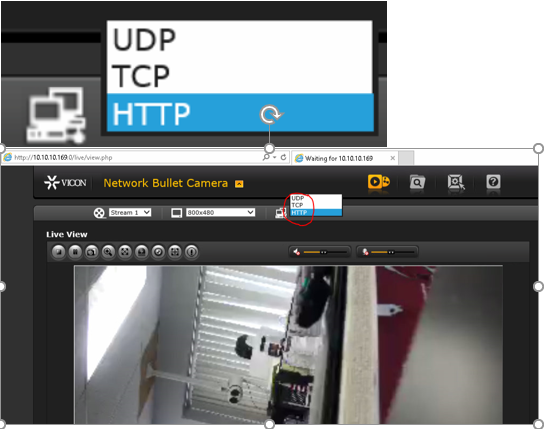
Now We want to confirm by going directly to the Camera Via ODM and VLC
https://www.videolan.org/vlc/index.html
https://sourceforge.net/projects/onvifdm/
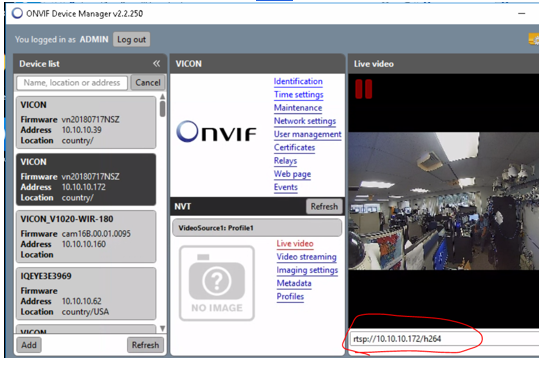
- Log into the camera Via ONVIF Device Manager
- You can get live view TCP by default, And you can find the rtsp stream to add into VLC which is circle
- Does the Ghost and Lag occur with ODM
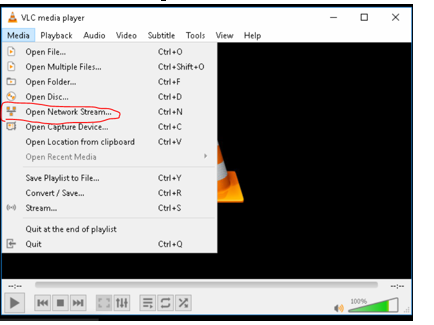
- Log into the camera via VLC Use password to the camera GUI
- You will need to run this test UDP and TCP. Please note if you are remoted in you can have a lag, Must be directly on the testing computer
- Does the Ghost and Lag occur? With VLC UDP
- Does the Ghost and Lag occur? With VLC TCP
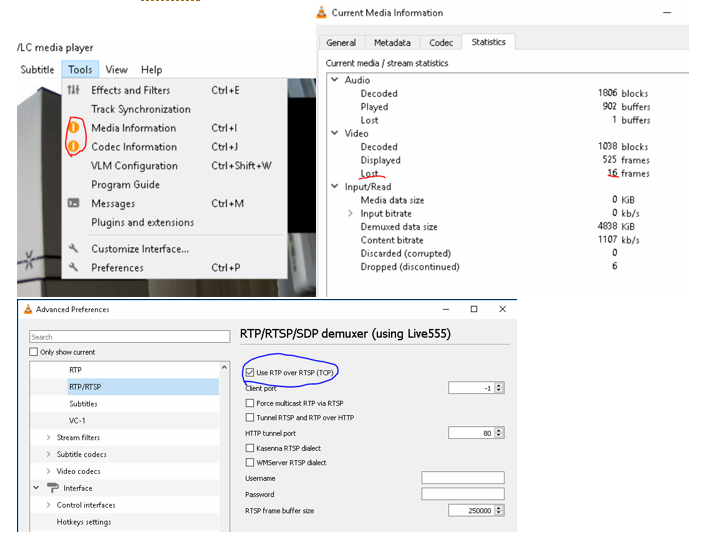
By default, the camera will connect UDP and must be changed back and forth from UDP to TCP and Back
Each time you switch UDP/TCP you must open a new connection.
- Is there a lot of dropped frames? For UDP Vs TCP
- To Check the frames, go to tools >> Media Information >> Statistics.
- To Switch UDP/TCP connection Go to Tools >> Preference >> Show Settings >> All >> Input Codecs >> Demuxers >> RTP/RTSP And Check (Use RTP over RTSP (TCP))
- Best would be to open up one VLC UDP and the same Camera again TCP and have them side by side.
If you have Issues with any of the Above, this will point to a camera or network issue.
Now to troubleshoot the difference would be How the topology is, Is it all the cameras, Certain camera models, or certain groups of cameras connected to the same switch.
Few things we can try and connect directly to the same switch as the camera see if you have the same issue. Run all the above test on the Client, NVR and APP server for 3rd opinions .
Ex: Confirm bandwidth throughput it good
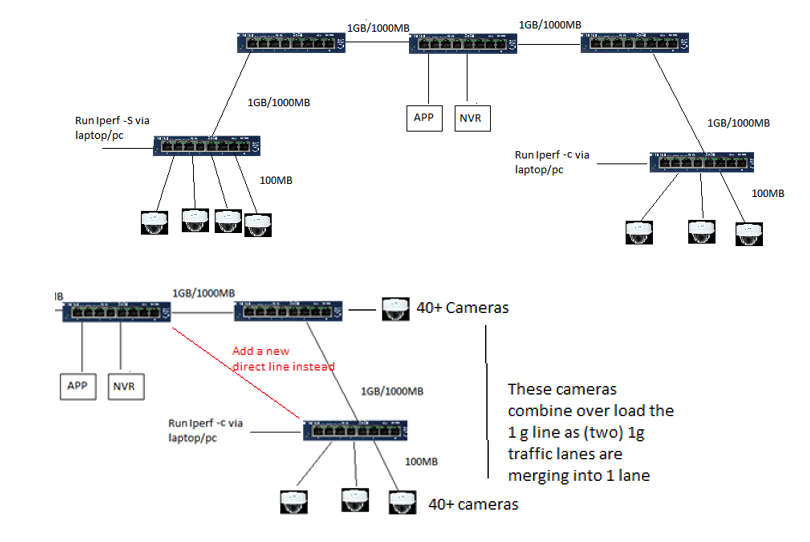
Run Ipref on your Network (Must be run on Opposite side of the network to confirm your switches and throughput is at 1gb all the way.) I will Attach a Separate Doc with this info to setup
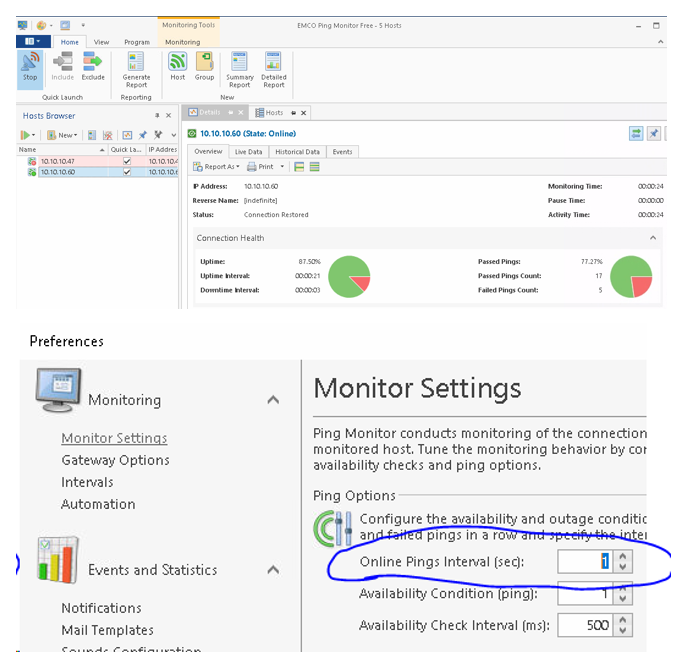
Ping the cameras see If you get any network drops Via EMco Ping
- Run EMCO Ping (Run this on 3 different parts of your network to get a 2nd Opinion)
Make sure Ping is set to every 1 Secs (You should be at 0% Drops at all times) If Any drops then there is a network issue. Switch/Wire/Port/etc. (Ping Default gateway, Cameras, appsrvr, nvr etc)
If all looks good, then we will have to troubleshoot Valerus.
You will run this test on client machine, NVR and APP
By Default Live view is UDP, Playback is TCP and Recording is UDP.
If Live view is ghosting In Valerus Attempt to switch live Viewing to TCP,
- Does the Issue still occur? If no confirm if playback has the ghosting issue.
- If playback has green screen and ghosting issue then you have a lot of UDP drop packets.
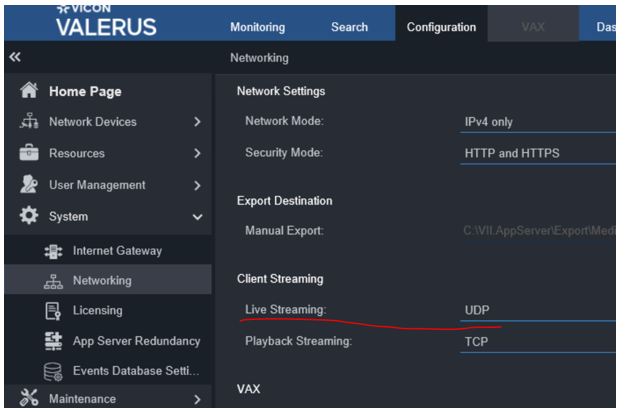
Switch Valerus camera to TCP Recording (Yes or No)
- Does the Issue still occur?
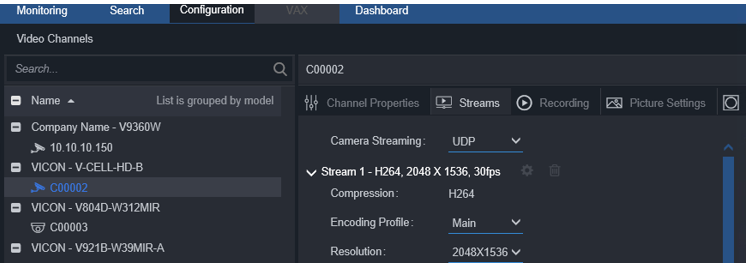
Now to Fully confirm we will do the same steps we did with VLC, remember how we used VLC directly to the cameras. We will now remove valerus out of the Equation and have VLC connect directly to the NVRS
We can connect VLC player directly to the NVR using Show IDs
We will run the test TCP and UDP in VLC. Password will be either NVR password or Valerus password to connect VLC to NVR (ADMIN\1234) by default
Check Frame lost also.
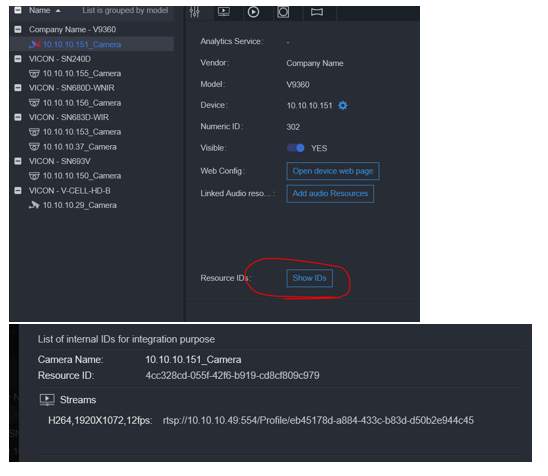
Now Remember Test will be run on Client machine/NVR/APP server.
Your client machine might have issues, but the NVR and APP server might not see the same results.
Which can mean the issue is from the client to the App server/Nvr.
Also check make sure local firewall is not blocking, Temp turn off the local firewall.
We also have antiviruses or Network scanning traffic that can delay the packets from getting to where it needs to be and cause issue with live view. Add the APP server and NVR IP to be excluded from scans.
Bit defender I know has a network scan feature that causes this issue. Malwarebytes thinks valerus player is a virus. And Webroot Blocks everything.