The VN-Keypad has 2 operating modes and can be configured for left or right-handed operation.
By default the keypad is configured in Valerus (VCOM) Mode and for right handed operation (joystick on the right). If the VN-Keypad is incorrectly configured you may have problems installing and/or using with Valerus or ViconNet.
When you first connect the VN-Keypad to the USB port of your PC,
a number of Buttons will illuminate indicating the mode and orientation of the keypad.
|
CORRECT! Valerus (VCOM) Mode |
INCORRECT! HID Joystick Mode |
 |
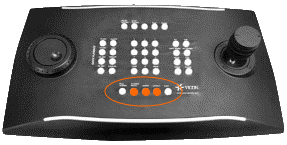 |
If the buttons nearest you light up (as shown above) then the joystick is configured for right hand operation. If you need to change this to left hand operation, this can easily be changed using
the VN-Keypad Test Tool.
If the Keypad is in the INCORRECT HID mode then please follow the procedure below.
|
Assuming the buttons are lit as shown above: 1. Press and hold the following keys in sequence Close, 2. Release in sequence Shift, P/T Speed, Close 3. A number of buttons should now illuminate or flash 4. Press button 4 to set to Valerus (VCOM) Mode.
|
 |
|
However if the buttons furthest from you are illuminated then: 1. Press and hold the following keys in sequence, 15 Sec, 2. Release in sequence Start Macro, 60 Sec, 15 Sec 3. A number of buttons should now illuminate or flash 4. Press button 9 to set to Valerus (VCOM) Mode.
|
|

The joystick can be calibrated if it malfunctions.To calibrate the joystick whilst in set up mode above:
1. Enter setup and press “CAM”. The LEDs in the center of the keyboard
will light up to mimic joystick movement during the calibration phase.
2. Move the joystick for a few seconds as far as it will go, in both a horizontal and vertical direction.
3. Rotate the knob clockwise and counterclockwise several times, as far as it will go.
4. Release the joystick to assess its position when idle.
5. After 5 seconds of inactivity, the keyboard will save the values and confirm the calibration.
The VN-Keypad Tester can now be used to confirm correct operation and orientation before connecting to Valerus/ViconNet.